<?xml version="1.0" encoding="utf-8"?><feed xmlns="http://www.w3.org/2005/Atom" ><generator uri="https://jekyllrb.com/" version="3.10.0">Jekyll</generator><link href="https://nuclearphoenix.net/feed.xml" rel="self" type="application/atom+xml" /><link href="https://nuclearphoenix.net/" rel="alternate" type="text/html" /><updated>2026-06-17T23:50:10+02:00</updated><id>https://nuclearphoenix.net/feed.xml</id><title type="html">NuclearPhoenix</title><subtitle>NuclearPhoenix - Just a physics and astronomy nerd who loves experimenting with electronics, coding, and diving into fascinating topics.</subtitle><entry><title type="html">New .net Domain!</title><link href="https://nuclearphoenix.net/2026/06/17/new-domain" rel="alternate" type="text/html" title="New .net Domain!" /><published>2026-06-17T23:00:00+02:00</published><updated>2026-06-17T23:00:00+02:00</updated><id>https://nuclearphoenix.net/2026/06/17/new-domain</id><content type="html" xml:base="https://nuclearphoenix.net/2026/06/17/new-domain"><![CDATA[<h2 id="nuclearphoenixxyz-is-now-nuclearphoenixnet">nuclearphoenix.xyz is now nuclearphoenix.net!</h2>

<p>After almost 5 years with my .xyz domain, there are no more reasons to keep using this obscure TLD. That’s why I’ve now finally switched everything over to .net for a more professional look and some additional independence. I have used the opportunity now to switch to a local, european domain provider and will be continuing to slowly switch all domains and emails over to Europe as good as possible.</p>

<p>The <a href="https://infiniterra.net">infiniterra.net</a> domain will be moved in the upcoming months too; you won’t notice anything regarding this, though, as the domain will remain the same.</p>

<p>And in the next few weeks I will be looking into improving my mailing setup, and move all of the mails to the new <a href="https://nuclearphoenix.net">nuclearphoenix.net</a> domain. In the meantime, these remain with the old .xyz domain.</p>

<p>If I can get it to work, <a href="https://nuclearphoenix.xyz">nuclearphoenix.xyz</a> should redirect all subpages and subdomains automatically to their correct .net counterpart to make this transition as smooth as possible. You may want to manually upgrade all of my progressive web apps that you’re using to use the new domain. Also, keep an eye out for any embeeded spectra that you exported from Gamma MCA for example, as these typically also contain the old domain. The .xyz domain will stay valid with me until at least around the end of 2027.</p>]]></content><author><name>NuclearPhoenix</name><email>hello@nuclearphoenix.xyz</email></author><category term="announcements" /><summary type="html"><![CDATA[nuclearphoenix.xyz is now nuclearphoenix.net!]]></summary></entry><entry><title type="html">Affordable macro time-lapse photography</title><link href="https://nuclearphoenix.net/2025/11/07/macro-plants" rel="alternate" type="text/html" title="Affordable macro time-lapse photography" /><published>2025-11-07T19:00:00+01:00</published><updated>2025-11-07T19:00:00+01:00</updated><id>https://nuclearphoenix.net/2025/11/07/macro-plants</id><content type="html" xml:base="https://nuclearphoenix.net/2025/11/07/macro-plants"><![CDATA[<p><em>Note: This article was originally posted elsewhere in the first half of 2025, contents may be outdated, but I decided to post it regardless, for my general audience and everyone interested in tech and carnivorous plants. This is a continuation of my other articles <a href="/2025/02/13/sundew-timelapse">New Timelapse Project!</a> and <a href="/2025/05/25/sundew-nutrients">A Washing Machine in Miniature? Digestive Fluid Cycling in Drosera scorpioides</a>.</em></p>

<h2 id="introduction">Introduction</h2>

<p>What actually happens when prey is caught? This fundamental question has certainly been asked by all of us at least once at the beginning of our “carnivorous career.” Especially with active traps such as the snap traps of Dionaea and the sticky traps of Drosera and Pinguicula, it is easy to observe the entire impressive process from prey capture to digestion and trap reactivation. The formation of the traps, the growth of the flowers, and the development of the plant are no less interesting. However, since the whole process naturally takes a certain amount of time and you don’t necessarily have the time to stare at a plant for days on end (as beautiful as it is), this is an ideal application for time-lapse macro photography. In this article, I would like to introduce you to a little “craft project” that offers a very inexpensive introduction to the world of macro photography and does not require a smartphone or any kind of commercial software.</p>

<h2 id="raspberry-pi-the-little-all-rounder">Raspberry Pi: The little all-rounder</h2>

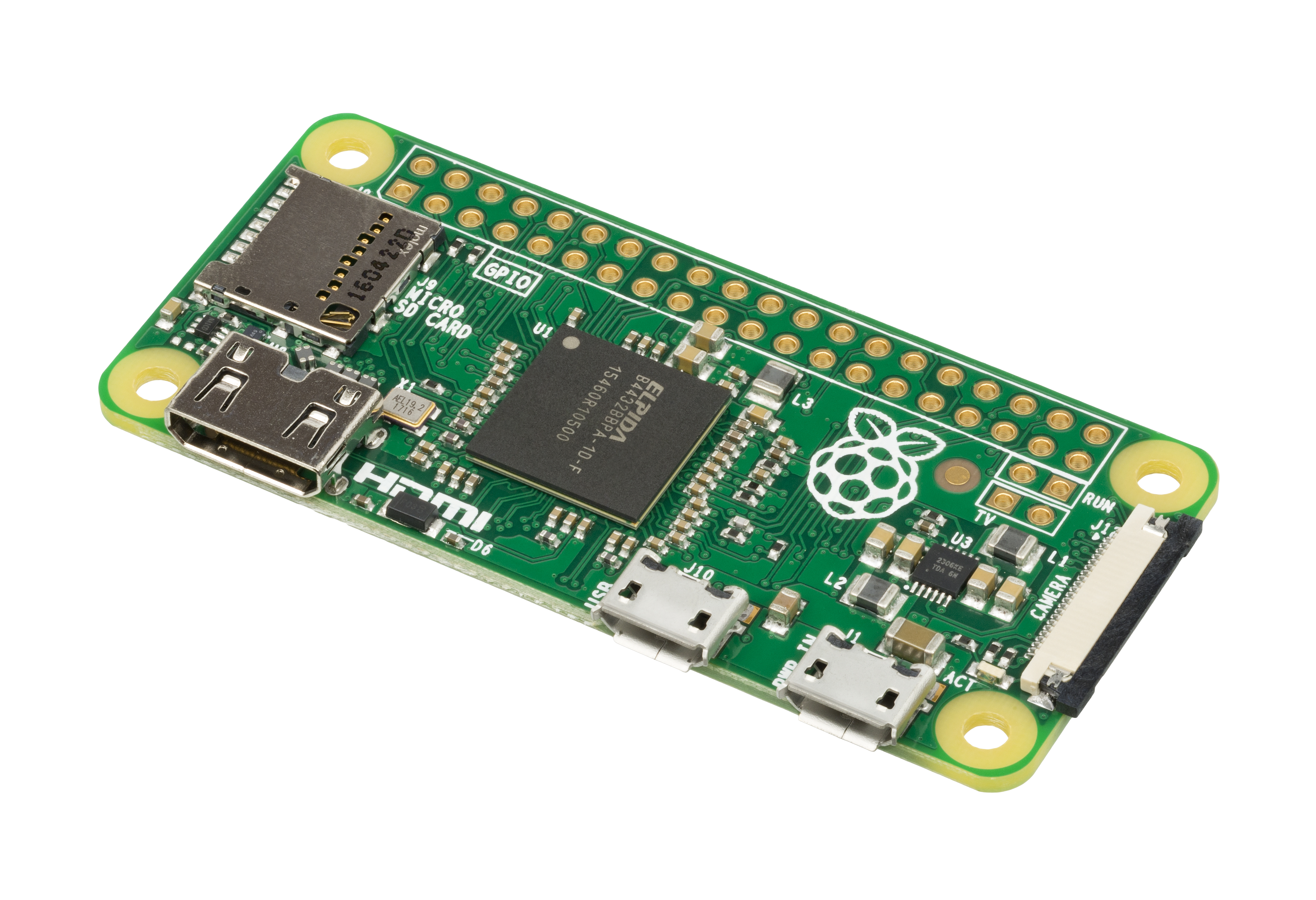
<figure class=""><a href="/assets/images/posts/tb1/Raspberry-Pi-Zero-FL.jpg" class="image-popup" title="Fig 1: The original Raspberry Pi Zero.
"><img src="/assets/images/posts/tb1/Raspberry-Pi-Zero-FL.jpg" alt="Raspberry Pi Zero" /></a><figcaption>
      Fig 1: The original Raspberry Pi Zero.

    </figcaption></figure>

<p>At the heart of the whole story is a Raspberry Pi Zero W – a small single-board computer for less than €20 that, apart from an additional microSD card, has everything you need to run a complete Linux operating system on it, just like on a desktop PC. Of course, this requires a certain willingness, or perhaps even some initial knowledge, to get to grips with Linux. But don’t worry, it doesn’t get too technical in this regard!</p>

<p>The nice thing about the Raspberry Pi is that, in addition to functioning as a “normal” computer, it also has a number of built-in interfaces for interacting with other hardware, be it sensors, LEDs, motors, or even cameras. The advantage of this is that it gives you complete freedom to put everything together according to your own ideas and needs.</p>

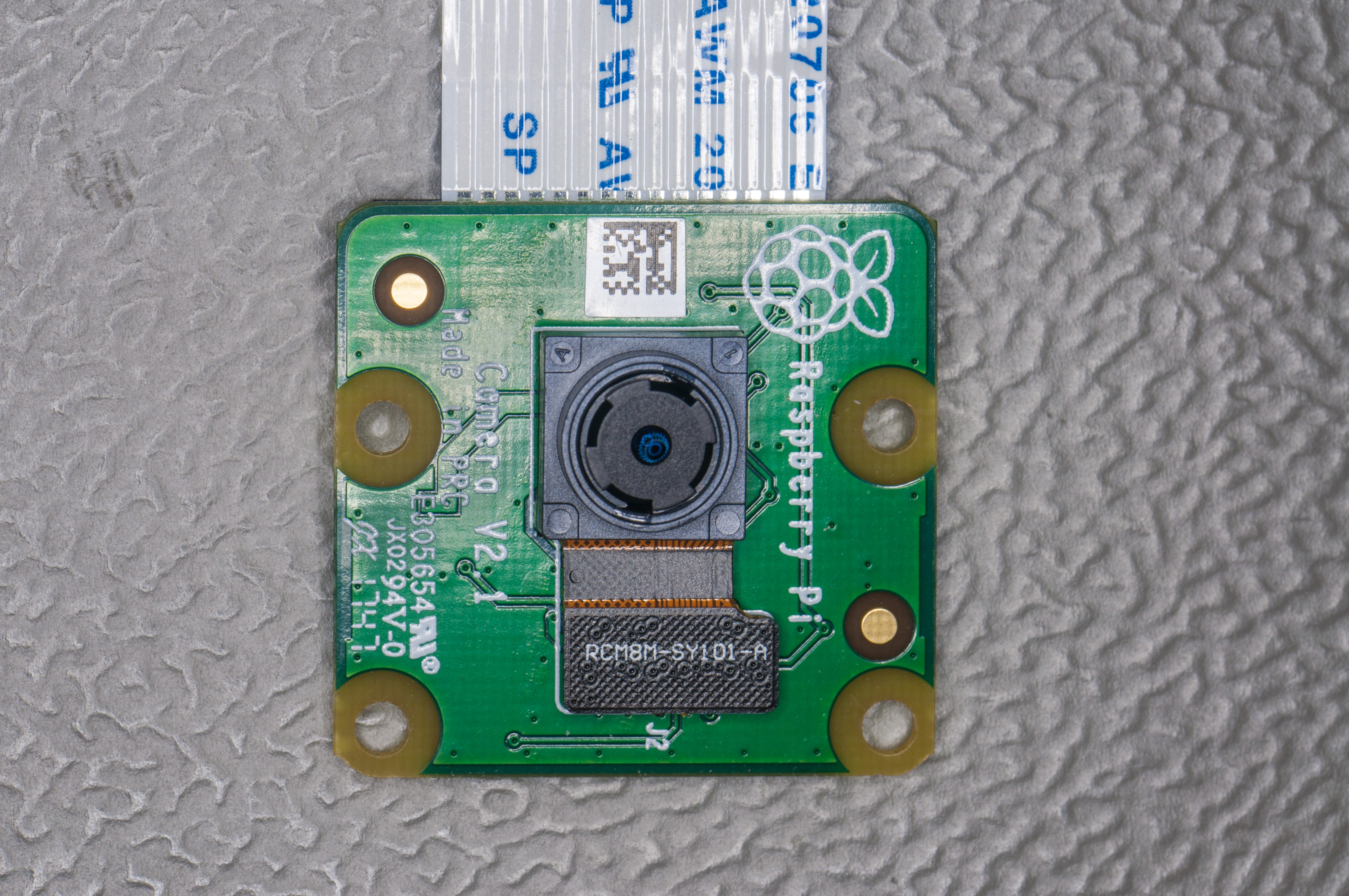
<p>There are many cameras available for the Raspberry Pi, especially from the manufacturer of the small computers themselves. Typically, the term “camera module” quickly comes to mind—these are small circuit boards that house a camera sensor with a little additional electronics. These modules are connected to the Raspberry Pi via a cable and are then ready for immediate use. The cameras usually do not have their own image processor, which means that processing takes place entirely in the computer itself and not in the modules. This means that you can do all sorts of things with the software on the computer and set it up according to your preferences. There is software for the command line for this purpose, or, as in my case, you can write your own little script to simplify the whole thing and make it easy to run at regular intervals.</p>

<figure class=""><a href="/assets/images/posts/tb1/1638_-_Raspberry_Pi_Camera_V2.jpg" class="image-popup" title="Fig 2: Symbolic photo of a Raspberry Pi Camera Module V2.
"><img src="/assets/images/posts/tb1/1638_-_Raspberry_Pi_Camera_V2.jpg" alt="Raspberry Pi Camera V2" /></a><figcaption>
      Fig 2: Symbolic photo of a Raspberry Pi Camera Module V2.

    </figcaption></figure>

<p>The specific camera module we are referring to here is the “Camera Module V2.” It is now almost 10 years old, so it is easy to get hold of, and unlike the Raspberry Pi modules with limited autofocus or even fixed focus, it has a lens that can be adjusted manually. This allows you to easily focus at a distance of 2–3 cm to capture a reasonable object size. Admittedly, manually adjusting the lens can be annoying, and the image quality is no longer up to date (8 MP, resolution 3280 x 2464 and a Sony IMX219 sensor), but I was all the more amazed at how easy it is to take really nice pictures!</p>

<p>I purchased a flexible gooseneck tripod with a table clamp to hold the camera and used a 3D printer to make a small mini housing for the camera. Everything could then be securely attached to the tripod’s 1/4” thread.</p>

<p>To operate and set up the operating system, you can basically follow any current tutorial online, of which there is no shortage these days. It takes about 15 minutes. The camera is connected to the Raspberry Pi via the ribbon cable, and you’re ready to go.</p>

<h2 id="the-finished-setup">The finished setup</h2>

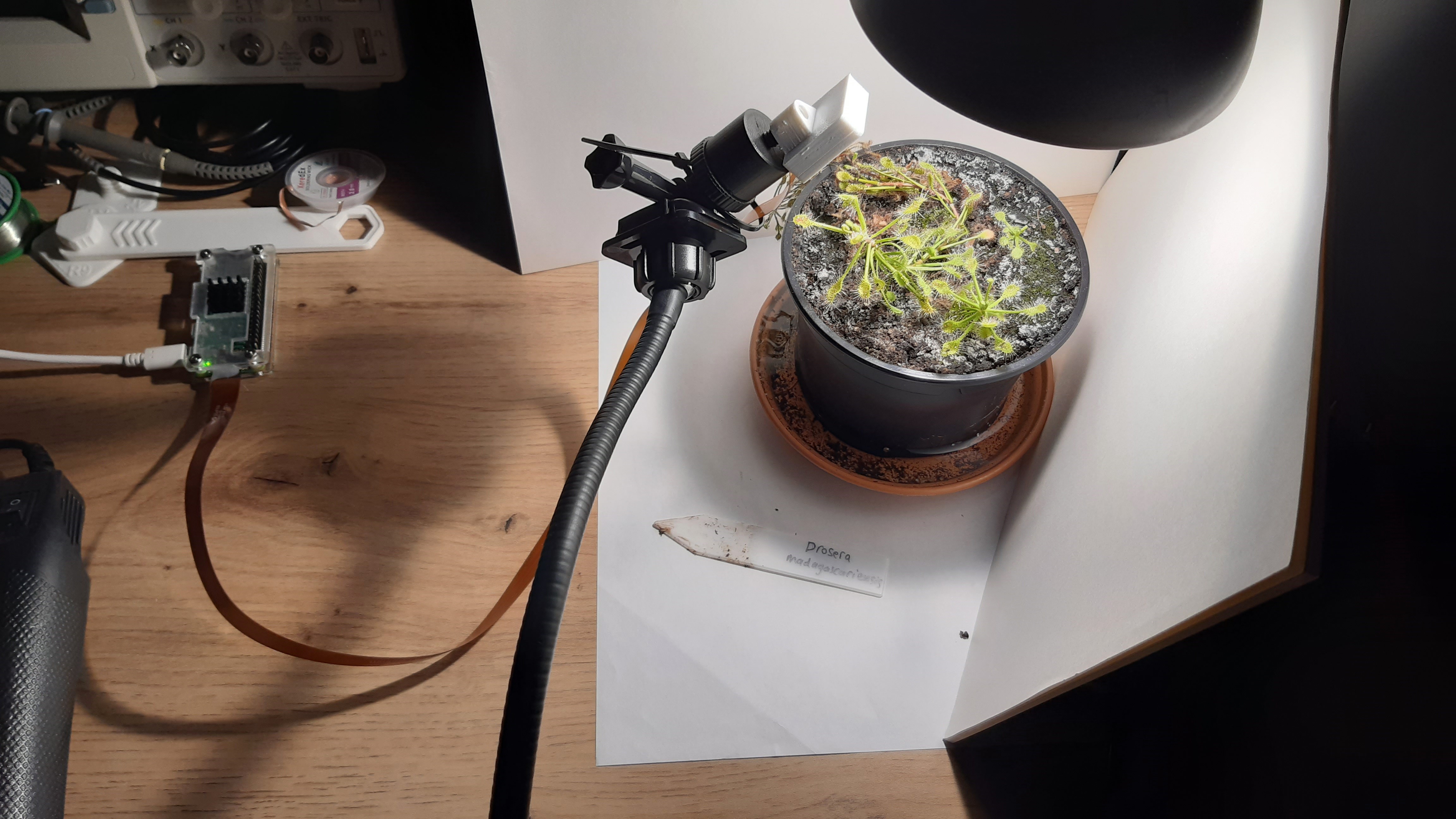
<figure class=""><a href="/assets/images/posts/tb1/20250317_204521.jpg" class="image-popup" title="Fig 3: The finished setup from above, with sundew and camera on a tripod. A few stacks of paper had to serve as a backdrop.
"><img src="/assets/images/posts/tb1/20250317_204521.jpg" alt="Finished setup from above" /></a><figcaption>
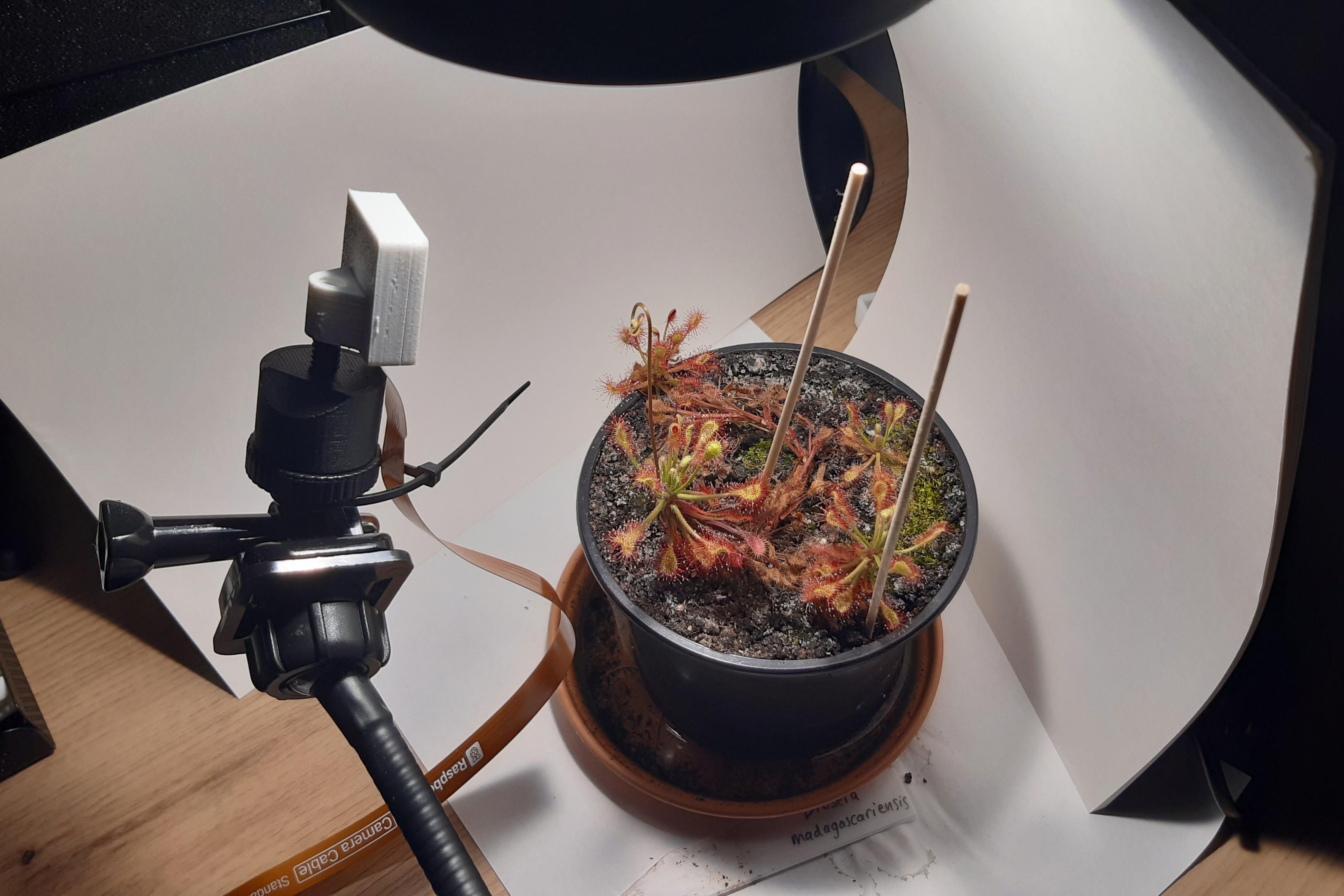
      Fig 3: The finished setup from above, with sundew and camera on a tripod. A few stacks of paper had to serve as a backdrop.

    </figcaption></figure>

<figure class=""><a href="/assets/images/posts/tb1/20250317_204551.jpg" class="image-popup" title="Fig 4: The finished structure from the side. Photogenic as it is, the sundew has decided to bloom. The distance shown here was significantly greater than normal in order to capture the entire growth of the flower in one picture.
"><img src="/assets/images/posts/tb1/20250317_204551.jpg" alt="Finished setup from the side" /></a><figcaption>
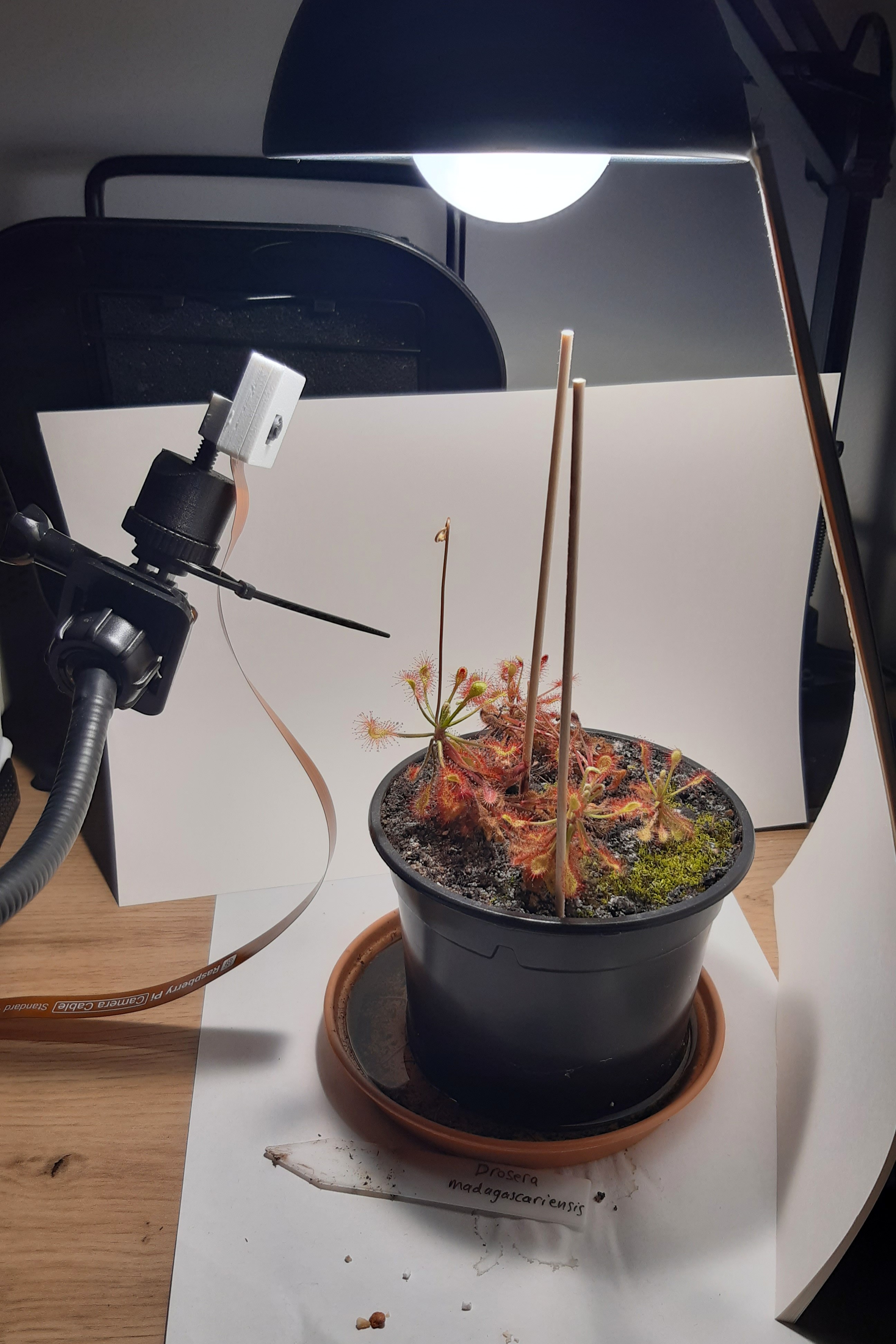
      Fig 4: The finished structure from the side. Photogenic as it is, the sundew has decided to bloom. The distance shown here was significantly greater than normal in order to capture the entire growth of the flower in one picture.

    </figcaption></figure>

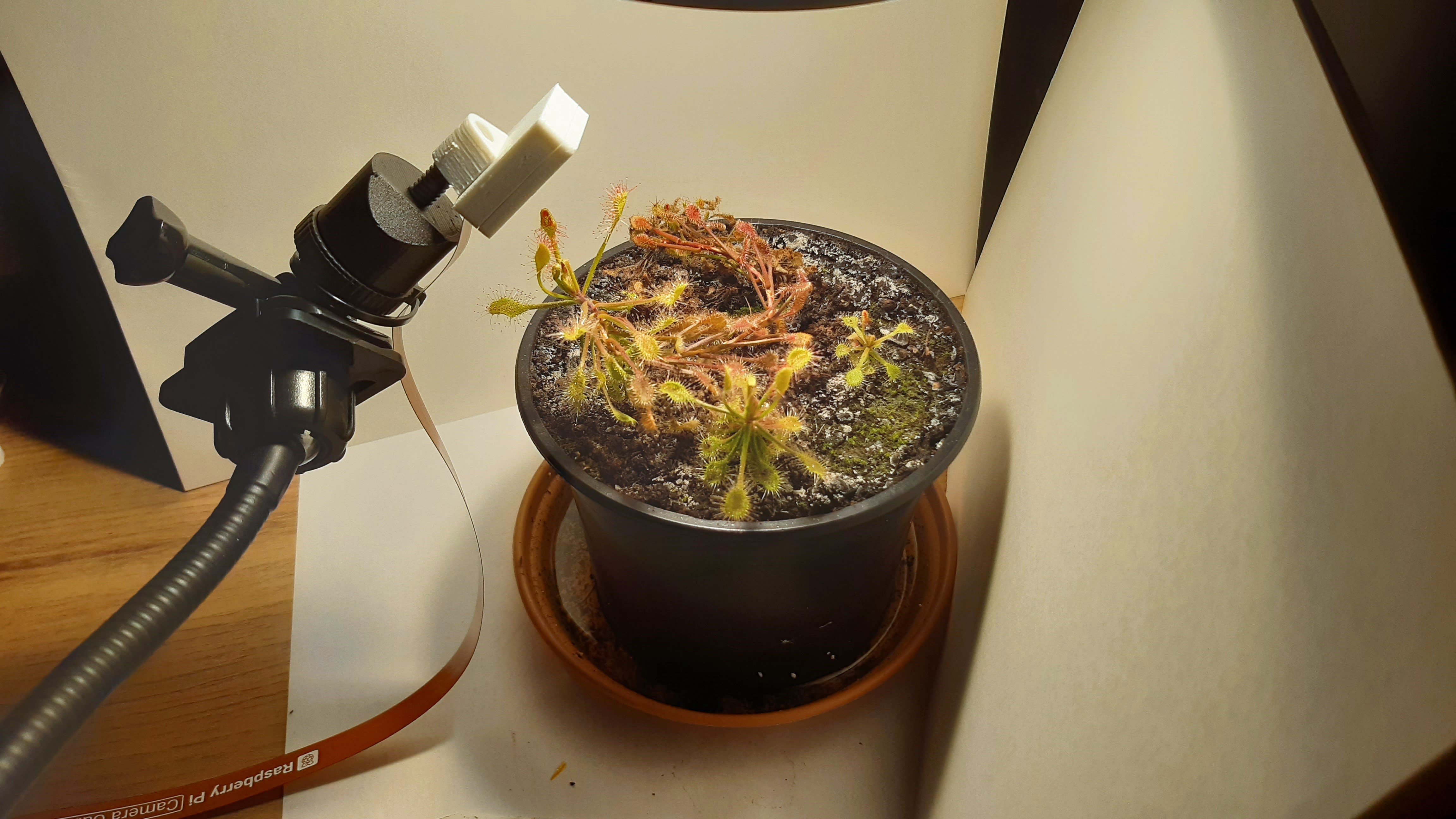
<p>Once everything has been prepared, all you need is good lighting and, by far the most important thing: the plant of your choice. In my case, I used a sundew (Drosera madagascariensis) and the normal LED light from my desk lamp for lighting. The finished setup can be seen in Figures 3 and 4.</p>

<p>Now it was time to start playing around a little: First, I had to determine the appropriate white balance values in the camera software and the exact distance from the object to the camera so that the image was well filled, and then adjust the lens accordingly for focusing. Since I wanted to upload the time-lapse videos to YouTube at the end, I decided on images with a resolution of 2560 x 1440 px (1440p). The camera wouldn’t have been able to handle 4k anyway, but the data volumes are already so large that I would have had to fiddle around with external hard drives.</p>

<p>As mentioned earlier, I wrote a small script that, when executed, takes a single picture with the settings I specified or desired. This script runs every minute, so that I end up with 60 photos per hour. Since I absolutely wanted to have 60 frames per second for the finished videos—for smoother playback—1 second in the finished video translates to exactly 1 hour of video material, and 1 day thus lasts 24 seconds in time-lapse.</p>

<p>I download the images obtained in this way to my PC via the network and automatically merge them into an .mp4 video file using additional software. That easily adds up to 12,000 images for one recording. Fortunately, I have not encountered any technical problems with this type of long-term recording so far, which means that the setup is also very stable.</p>

<h2 id="results-and-interesting-findings">Results and interesting findings</h2>

<figure class=""><a href="/assets/images/posts/tb1/Comp1.png" class="image-popup" title="Fig 5: Two photos taken within one minute; one tentacle appears to have already turned completely toward its prey within this time, with other (longer) tentacles following close behind.
"><img src="/assets/images/posts/tb1/Comp1.png" alt="Capturing prey in high speed" /></a><figcaption>
      Fig 5: Two photos taken within one minute; one tentacle appears to have already turned completely toward its prey within this time, with other (longer) tentacles following close behind.

    </figcaption></figure>

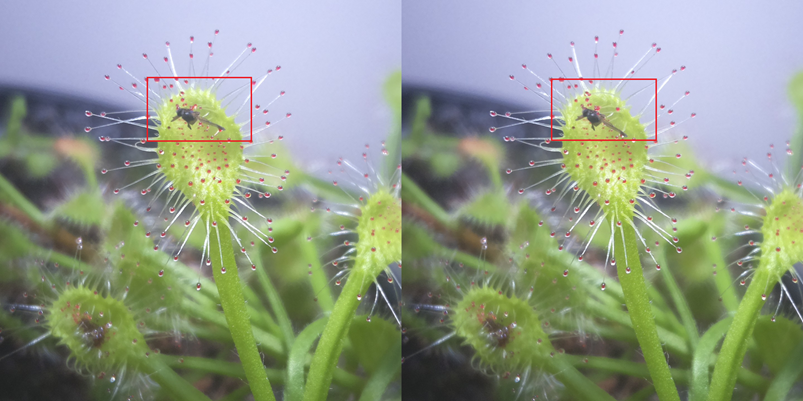
<p>In the nearly two months that the setup has been running (as of March 2025), it has been in almost continuous use, still with the same plant. I wanted to test so many different things and observe the plant’s reactions. It started with a very impressive demonstration (at least for me) of the reaction speed of D. madagascariensis. I had placed a fungus gnat on one of the plant’s sticky leaves and lo and behold, within less than a minute, the first tentacle seemed to have moved entirely toward the insect, with a few more following close behind (see Figure 5)! I knew that the plants react quickly, but not that quickly. Accordingly, the photo interval of one minute was even too long, at least in the initial phase.</p>

<p>The digestive juices secreted by the plant and soaking the insect were also clearly visible. After about three to four days, this process seemed to end. Most of the tentacles had moved away from their prey, leaving only the dry, indigestible remains behind.</p>

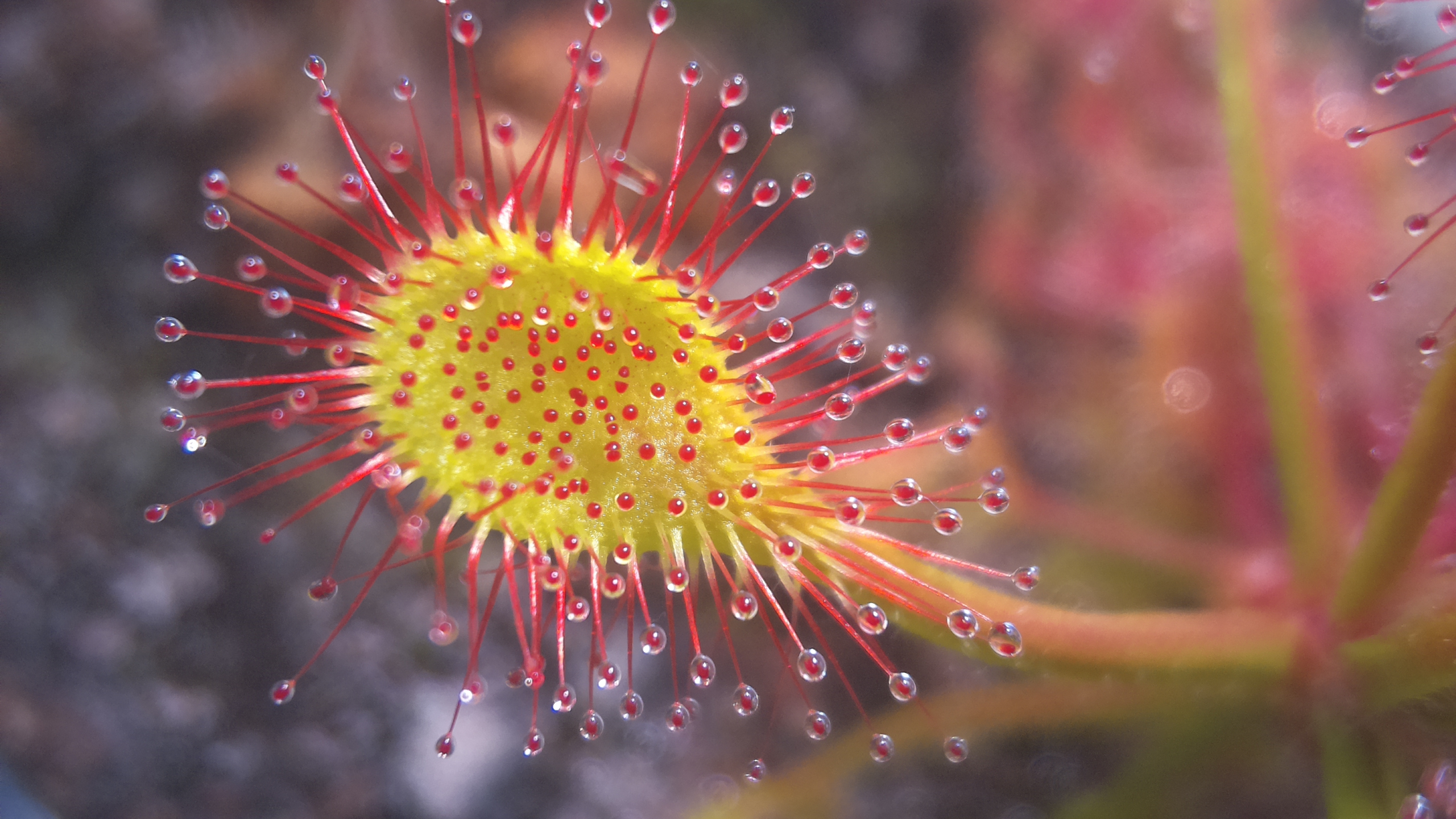
<figure class=""><a href="/assets/images/posts/tb1/leaf1.jpg" class="image-popup" title="Fig 6: Beautiful trap leaf of D. madagascariensis.
"><img src="/assets/images/posts/tb1/leaf1.jpg" alt="Trap leaf of D. madagascariensis" /></a><figcaption>
      Fig 6: Beautiful trap leaf of D. madagascariensis.

    </figcaption></figure>

<p>Something else I quickly learned during the first shoot was how incredibly fast this particular plant grows. I had to change the camera position several times because other trap leaves had grown in front of it or the object in focus had moved too far away. Within less than a week, completely “fresh” trap leaves were already hunting for prey here. For the next shots, I finally paid more attention to having a “clear path” and finding an angle that was less prone to interference.</p>

<p>Incidentally, the plant also reacted to experiments with indigestible pieces of perlite, not much slower than usual (in terms of reaction time), but with significantly fewer moving tentacles. In both cases where I tried this, however, at least one tentacle moved completely toward the source of this purely mechanical stimulus, “looked” at the object, and then quickly returned to its starting position.</p>

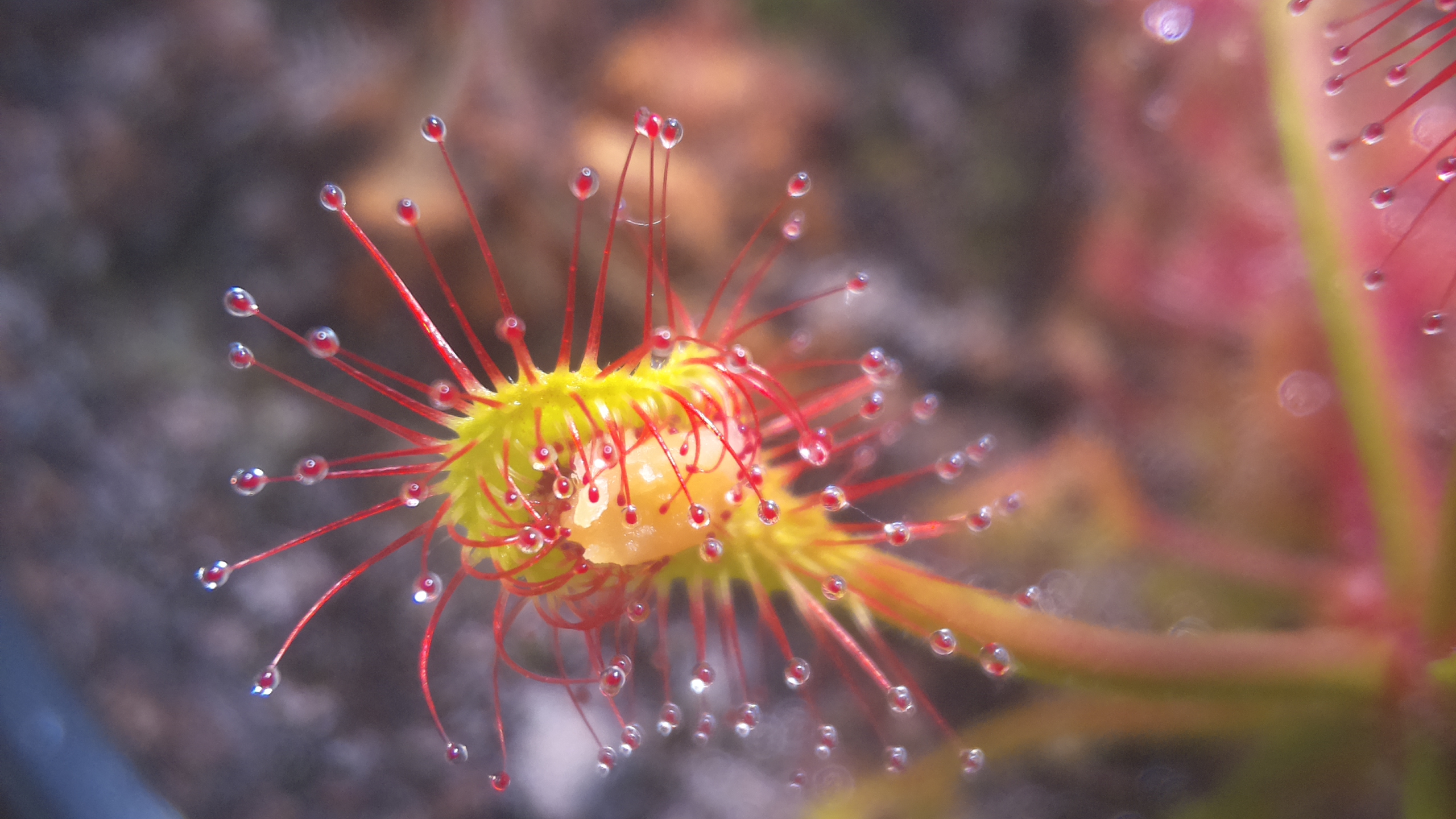
<figure class=""><a href="/assets/images/posts/tb1/peanut.jpg" class="image-popup" title="Fig 7: A busy leaf that is currently mobilizing everything it has to digest this little piece of peanut.
"><img src="/assets/images/posts/tb1/peanut.jpg" alt="Drosera eating peanut" /></a><figcaption>
      Fig 7: A busy leaf that is currently mobilizing everything it has to digest this little piece of peanut.

    </figcaption></figure>

<p>Incidentally, this sundew also seems to like peanuts, unsalted of course. In a time-lapse video, you could actually see how a small piece swelled up after being enclosed by many tentacles, and the leaf began to wrap itself around it. A snapshot of this process can be seen in Figure 7.</p>

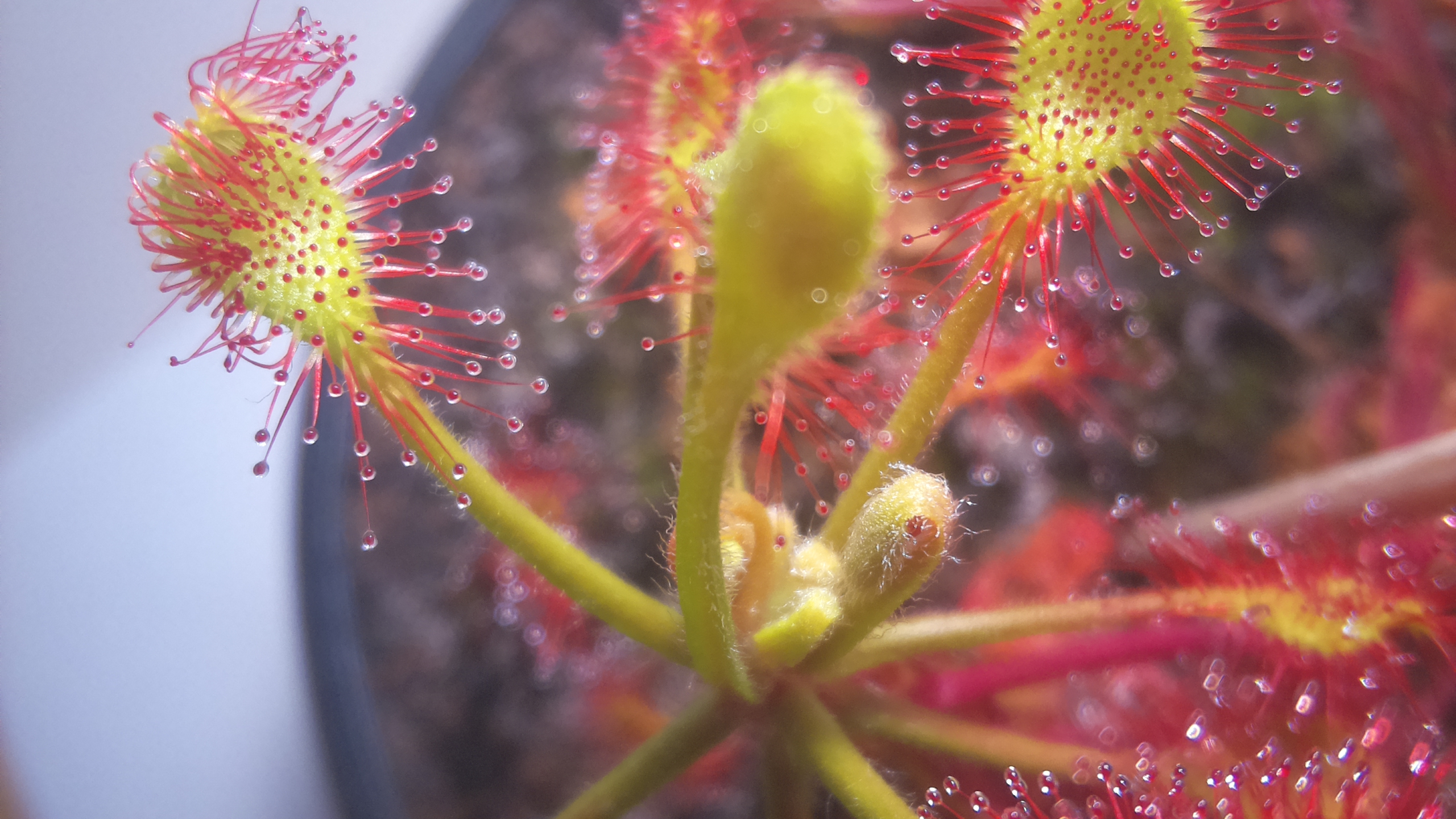
<figure class=""><a href="/assets/images/posts/tb1/1741039536.jpg" class="image-popup" title="Fig 8: On the left of the picture: a young trap leaf unfolding its tentacles.
"><img src="/assets/images/posts/tb1/1741039536.jpg" alt="Unfolding trap leaf" /></a><figcaption>
      Fig 8: On the left of the picture: a young trap leaf unfolding its tentacles.

    </figcaption></figure>

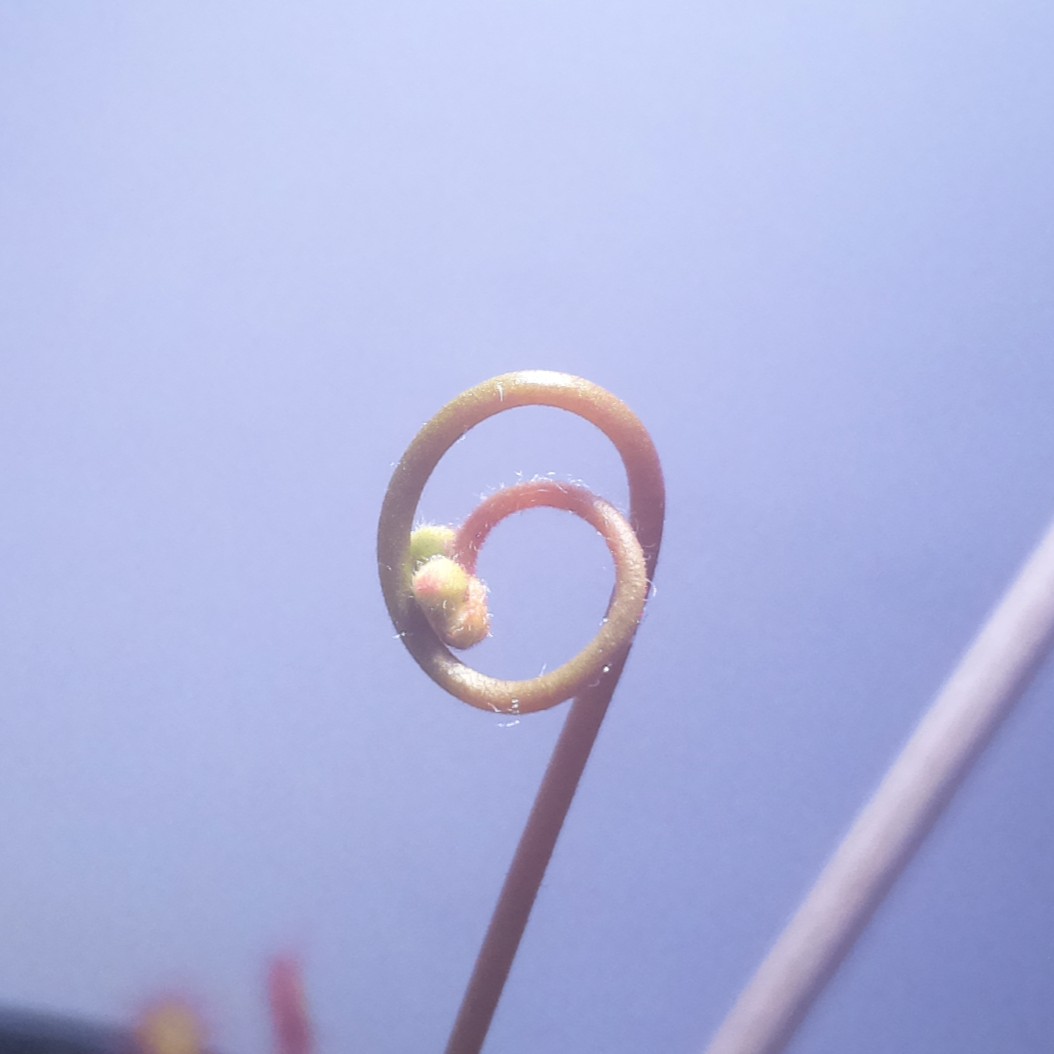
<figure class=""><a href="/assets/images/posts/tb1/flower.jpg" class="image-popup" title="Fig 9: Coiled upper part of the inflorescence of D. madagascariensis.
"><img src="/assets/images/posts/tb1/flower.jpg" alt="Growing flower" /></a><figcaption>
      Fig 9: Coiled upper part of the inflorescence of D. madagascariensis.

    </figcaption></figure>

<p>Incidentally, it is also interesting to observe the growth of the plants in general; from the growth of a trap leaf with the unfolding of the tentacles to the ever-higher inflorescence – the upper part of which, together with the flowers, remains more or less the same until the end and grows upwards from below.</p>

<h2 id="conclusion-and-future">Conclusion and future</h2>

<p>The costs of this setup were very manageable: all in all, it came to less than €50. Since I already had an unused Raspberry Pi Zero with a microSD card lying around, the project only cost me around €20. The initial setup of the software was quite quick and does not need to be changed after the first time. In this respect, I was really amazed at how easy it is to take really interesting pictures of these beautiful plants, and I can only warmly recommend that each of you take a look at them on the website.</p>

<p>One thing I will definitely improve in the future is the camera or camera module itself. On the one hand, higher image quality is always better, of course, and on the other hand, autofocus is obviously much more convenient. I will consider the exact implementation when the budget is available and a suitable solution can be found. It is important that the camera can still focus at a distance of only a few centimeters.</p>

<p>Most of my planned shots of the Drosera madagascariensis shown here are now complete, which means I will also turn my attention to other plants, such as D. rotundifolia, D. adelae, D. scorpioides, and P. vallisneriifolia. I will endeavor to always publish the most interesting observations and photos. By the time you read this, I will probably have taken quite a few new photos.</p>

<p>Please feel free to let me know what you think of this project, what you think could be improved, or what else would be interesting to observe!</p>

<h2 id="links">Links</h2>

<p><strong><a href="https://www.youtube.com/playlist?list=PL9KDnhzZ8JxkJ870sSdXsxbq0SN13xDwH">Click here to go to the complete YouTube playlist!</a></strong></p>

<p>Here are the links to videos of most of the recordings mentioned in the text:</p>

<ul>
  <li>The very first time-lapse:</li>
</ul>

<!-- Courtesy of embedresponsively.com -->

<div class="responsive-video-container">
    <iframe src="https://www.youtube-nocookie.com/embed/GlIcrZ2fjdo" frameborder="0" webkitallowfullscreen="" mozallowfullscreen="" allowfullscreen=""></iframe>
  </div>

<ul>
  <li>The second time-lapse of higher quality:</li>
</ul>

<!-- Courtesy of embedresponsively.com -->

<div class="responsive-video-container">
    <iframe src="https://www.youtube-nocookie.com/embed/vGulKidCHYI" frameborder="0" webkitallowfullscreen="" mozallowfullscreen="" allowfullscreen=""></iframe>
  </div>

<ul>
  <li>Recording with the peanut piece:</li>
</ul>

<!-- Courtesy of embedresponsively.com -->

<div class="responsive-video-container">
    <iframe src="https://www.youtube-nocookie.com/embed/c-MizmCr50M" frameborder="0" webkitallowfullscreen="" mozallowfullscreen="" allowfullscreen=""></iframe>
  </div>

<ul>
  <li>Recording of the plant’s growth with a focus on the inflorescence:</li>
</ul>

<!-- Courtesy of embedresponsively.com -->

<div class="responsive-video-container">
    <iframe src="https://www.youtube-nocookie.com/embed/0ImiWOcy3m8" frameborder="0" webkitallowfullscreen="" mozallowfullscreen="" allowfullscreen=""></iframe>
  </div>

<p><strong>Please discuss below! For my german-speaking audience, there is also a post on the <a href="https://forum.carnivoren.org/forums/topic/60027-g%C3%BCnstige-makro-aufnahmen-im-zeitraffer/">german carnivorous plants forums</a>!</strong></p>]]></content><author><name>NuclearPhoenix</name><email>hello@nuclearphoenix.xyz</email></author><category term="announcements" /><category term="showcase" /><category term="carnivorous-plants" /><summary type="html"><![CDATA[Note: This article was originally posted elsewhere in the first half of 2025, contents may be outdated, but I decided to post it regardless, for my general audience and everyone interested in tech and carnivorous plants. This is a continuation of my other articles New Timelapse Project! and A Washing Machine in Miniature? Digestive Fluid Cycling in Drosera scorpioides.]]></summary></entry><entry><title type="html">I worked on my own Minecraft clone!</title><link href="https://nuclearphoenix.net/2025/06/26/infiniterra" rel="alternate" type="text/html" title="I worked on my own Minecraft clone!" /><published>2025-06-26T18:00:00+02:00</published><updated>2025-06-26T18:00:00+02:00</updated><id>https://nuclearphoenix.net/2025/06/26/infiniterra</id><content type="html" xml:base="https://nuclearphoenix.net/2025/06/26/infiniterra"><![CDATA[<h2 id="introduction">Introduction</h2>

<p>Have you ever thought about recreating Minecraft on your own, just because you want to try something new and maybe are a bit disillusioned? Well, that’s me! But before we get into any details, how, why and what am I thinking by working on such a seemingly huge project?</p>

<p>First off, there is absolutely no pressure on development to get something released or similar. I worked on this for about three months before having to stop for unrelated personal reasons, and since the pace has slowed down considerably. Before it just rots on my hard drive, I decided to publish everything. Who knows, somebody might get inspired to do something similar. Let’s see where the journey takes us, while I’m having fun working on the game.</p>

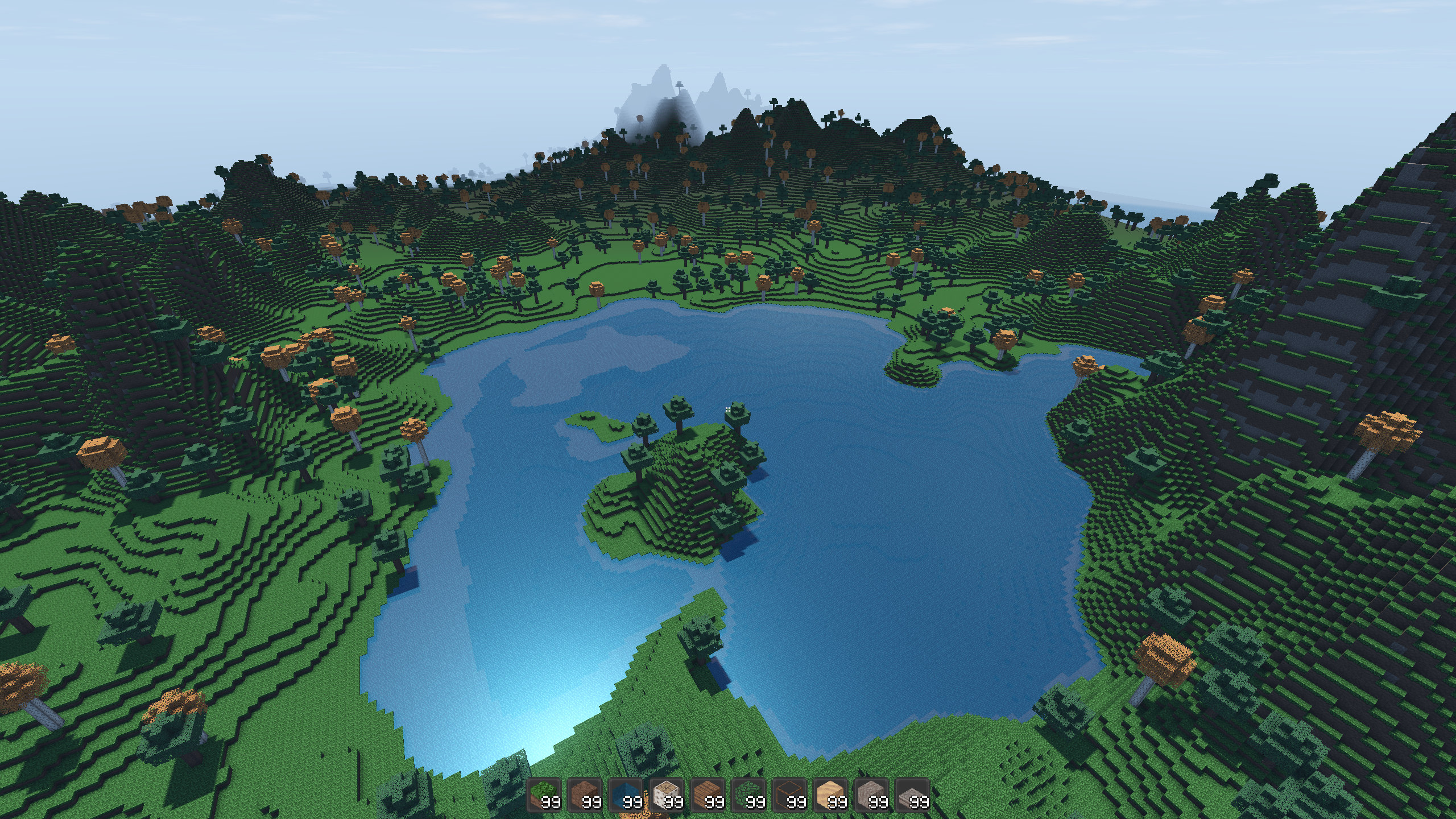
<p><img src="/assets/images/posts/infiniterra-screenshot1.jpg" alt="Ingame screenshot" /></p>

<p>Before starting with this, I had experience with working on smaller projects in the Godot Engine, which is why I chose it as the base for this. Working on voxel games in a full-blown game engine is often seen as only borderline possible due to the huge amount of data handling required at any moment, and most games in this niche do in fact use custom implementations such as Minecraft and (former) Minetest. Now, I found this awesome module for Godot called <a href="https://github.com/Zylann/godot_voxel">Voxel Tools</a>, which provides you with a strong foundation of tools to work with voxel-based terrain. That’s when everything started.</p>

<h2 id="goals">Goals</h2>

<p>The goals are straightforward: Recreate something like the early Minecraft Java Alpha with a number of changes and improvements:</p>

<p>Extend the world borders in the vertical direction to be the same as those of the rest of the world. In the future, this can be used to house a hell dimension down in the depths of the world and a space dimension way up in the sky, similar to the implementation in Terraria.
Improve ambiance with better lighting, sounds, and general atmosphere.
Revamp the crafting system to resemble Terraria’s approach.
Add a ton of quality of life features, e.g. running with the inventory open, inventory sort button, torches lighting up the area when equipped, a world preview on the loading menu screen …</p>

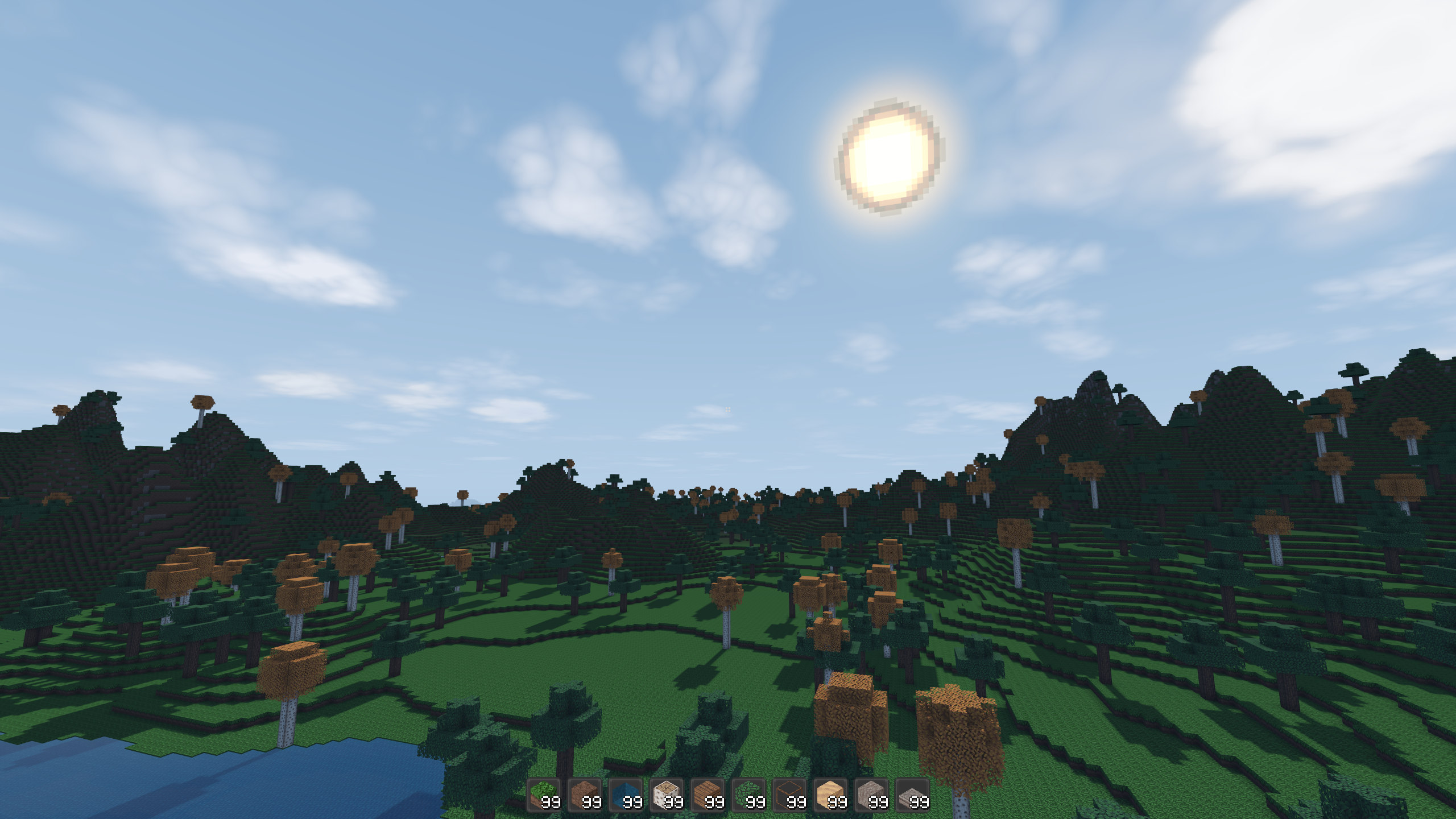
<p><img src="/assets/images/posts/infiniterra-screenshot2.jpg" alt="Ingame screenshot" /></p>

<h2 id="where-are-we-at">Where are we at?</h2>

<p>At the moment, the following things are implemented:</p>

<ul>
  <li>Procedural world generation of a single biome with custom terrain or flat worlds. Added two different types of trees and water (non-flowing). Worlds are about 1B x 1B x 1B blocks large.</li>
  <li>Player movement with dynamic camera effects including underwater (with audio) and zooming.</li>
  <li>Inventory system with auto-sort feature and trash bin to delete unwanted items.</li>
  <li>View distances up to 64 chunks, needs a lot of resources at this max though. Recommended are ranges between 16 and 32, depending on your system. Expect the game to need a lot more resources anyways. I can run at 32 chunks render distance at 144 Hz with a 3060 Ti no problem, but 64 chunks get a bit stuttery, so YMMV.</li>
  <li>Basic “chat” with a few commands.</li>
  <li>Saving and loading worlds.</li>
  <li>Day- and night cycle and adequate lighting.</li>
  <li>Around a dozen different blocks than can be placed and removed.</li>
  <li>Some F-keys are implemented just like they are in Minecraft, e.g. F1, F5, F12.</li>
  <li>The game uses the Godot Jolt physics engine with the terrain, which could be of great use in the future.</li>
</ul>

<!-- Courtesy of embedresponsively.com -->

<div class="responsive-video-container">
    <iframe src="https://www.youtube-nocookie.com/embed/IuvnaJeBEwM" frameborder="0" webkitallowfullscreen="" mozallowfullscreen="" allowfullscreen=""></iframe>
  </div>

<p>The most important things that are still missing currently – roughly in order:</p>

<ul>
  <li>More varied terrain generation: caves, multiple biomes, rivers, etc.</li>
  <li>More items and blocks</li>
  <li>A working crafting system</li>
  <li>Fluids, like running water from blocks</li>
  <li>More sounds, especially a larger variety for those used in steps, placing and breaking.</li>
  <li>Working slabs—currently, they can only be placed in one way and one per block</li>
</ul>

<p>The terrain part will be the thing I’m going to start working on, especially getting a nice cave generator and improving on the slow tree generator. After this, I’ll see if I continue to do biomes, or if I start setting up a crafting system first. Both obviously require me to add more blocks and items to the game. Adding blocks is pretty easy and I plan to make it moddable, however, I’m still searching for an efficient way to do the UV mapping of the textures to the cubes themselves, so if anyone has a better idea, please reach out!</p>

<p>You can have a look yourself and download the demo that I just released. Head over to the  <a href="https://www.indiedb.com/games/infiniterra/downloads">files tab of the IndieDB game site</a>. When in doubt, expect a ton of bugs :D</p>

<p><strong>Please share all your feedback, ideas, suggestions and so on! Every bit of response to this means a lot to me. Stay tuned for more!</strong></p>

<p>For all my German-speaking people here, there will be a short showcase of the game in its current state soon on my second channel on Youtube: <a href="https://www.youtube.com/@NuclearPhoenixxGaming">@NuclearPhoenixxGaming</a></p>]]></content><author><name>NuclearPhoenix</name><email>hello@nuclearphoenix.xyz</email></author><category term="announcements" /><category term="showcase" /><category term="games" /><summary type="html"><![CDATA[Introduction]]></summary></entry><entry><title type="html">A Washing Machine in Miniature? Digestive Fluid Cycling in Drosera scorpioides</title><link href="https://nuclearphoenix.net/2025/05/25/sundew-nutrients" rel="alternate" type="text/html" title="A Washing Machine in Miniature? Digestive Fluid Cycling in Drosera scorpioides" /><published>2025-05-25T20:00:00+02:00</published><updated>2025-05-25T20:00:00+02:00</updated><id>https://nuclearphoenix.net/2025/05/25/sundew-nutrients</id><content type="html" xml:base="https://nuclearphoenix.net/2025/05/25/sundew-nutrients"><![CDATA[<p>While filming my Drosera scorpioides digesting a small fly, I stumbled across something unexpected: visible waves of digestive fluid being pumped into the insect and then reabsorbed — almost like a tiny washing machine cycle. You can actually see the liquid being flushed into the prey and then drawn back into the plant in repeating pulses.</p>

<p>At first, I thought it was just a one-off visual quirk, but the rhythm was too clear and consistent to ignore. It seems as though the plant soaks the insect in enzymes to break it down, then absorbs the resulting nutrient-rich soup, before repeating the process. I didn’t expect such a dynamic, cyclical digestive pattern in a sundew — and especially not one this small.</p>

<p>Here’s the video:</p>

<!-- Courtesy of embedresponsively.com -->

<div class="responsive-video-container">
    <iframe src="https://www.youtube-nocookie.com/embed/lBp2hSbf6qg" frameborder="0" webkitallowfullscreen="" mozallowfullscreen="" allowfullscreen=""></iframe>
  </div>

<p>I haven’t seen this behavior described in detail before – could this be a common mechanism that just isn’t often observed? Or something unique to pygmy sundews under certain conditions?</p>

<p>If anyone out there has more insight into what’s happening here – whether botanical, microscopic, or just plain curious — I’d love to hear your thoughts!</p>]]></content><author><name>NuclearPhoenix</name><email>hello@nuclearphoenix.xyz</email></author><category term="announcements" /><category term="showcase" /><category term="carnivorous-plants" /><summary type="html"><![CDATA[While filming my Drosera scorpioides digesting a small fly, I stumbled across something unexpected: visible waves of digestive fluid being pumped into the insect and then reabsorbed — almost like a tiny washing machine cycle. You can actually see the liquid being flushed into the prey and then drawn back into the plant in repeating pulses.]]></summary></entry><entry><title type="html">New Timelapse Project!</title><link href="https://nuclearphoenix.net/2025/02/13/sundew-timelapse" rel="alternate" type="text/html" title="New Timelapse Project!" /><published>2025-02-13T20:00:00+01:00</published><updated>2025-02-13T20:00:00+01:00</updated><id>https://nuclearphoenix.net/2025/02/13/sundew-timelapse</id><content type="html" xml:base="https://nuclearphoenix.net/2025/02/13/sundew-timelapse"><![CDATA[<h2 id="introduction">Introduction</h2>

<p>Let me introduce you to my newest small project: I’m combining my love for carnivorous plants with my passion for tinkering with things, resulting in a timelapse photography setup to observe the intricate movement of the plants after contact with prey, such as insects. In this very first test pass, I’ve already learned a lot of things, but nevertheless the timelapse looks beautiful, nevermind the multiple repositionings due to the plant itself moving and growing in our way. 😉</p>

<p>I’ve uploaded the result to Youtube already, and another one that’s already much better will follow soon! For this I’ve simply taken my Drosera madagascariensis (sundew native to Africa) and put a dead fly on one of its leaves.</p>

<!-- Courtesy of embedresponsively.com -->

<div class="responsive-video-container">
    <iframe src="https://www.youtube-nocookie.com/embed/GlIcrZ2fjdo" frameborder="0" webkitallowfullscreen="" mozallowfullscreen="" allowfullscreen=""></iframe>
  </div>

<p>In total, the timelapse took around 10 days. Over the course of the video you can clearly see the digestion process starting some time after it detects the insect, slowly dissolving nutrients from it. Interestingly, the first tentacles snatched onto the insect extremely quickly, in just one or two minutes at most, which was much faster than I anticipated! After that, it took quite some time for the plant to start moving more and to start the digestion process, so I guess it was checking out wheter it’s digestible or not before expending the energy to move. From what I can tell, it took around 5 days until there was no more movement visible and no more fluid around the prey, so my best guess is that from this point on, it had already been fully digested.</p>

<h2 id="behind-the-scenes">Behind The Scenes</h2>

<h3 id="setup">Setup</h3>

<p>The setup is extremely basic and cheap. The core components are an ancient Raspberry Pi Zero W (yes, the original one, revision 1.1!), and a Raspberry Pi Camera Module 2 (the almost-10-year-old sensor module). I then 3D printed a couple of parts for the camera to mount onto a flexible camera mount. The neat thing about the old camera module is that you can easily get focus on extremely close-up objects by turning the lense. A more modern camera with a powered autofocus would be better, obviously, due to the ease of use alone. However, these tend to not focus at close enough distances and easily get very expensive. Typically, the distance between the lense and the plant is ~3cm in my case. That is enough to have a neat FOV on the entire plant at 1440p.</p>

<p><img src="/assets/images/posts/madagascariensis_timelapse1.jpg" alt="Overall setup" /></p>

<p><img src="/assets/images/posts/madagascariensis_timelapse2.jpg" alt="Close up of the setup" /></p>

<p>Something to watch out for, in this case, is the plant grows and moves really quickly, and depending on the angle and distance to the point of interest, I need to adjust the focus every couple of hours. I also have to choose an appropriate leaf for the timelapse in order to prevent the plant growing in front of the camera like in my first test! :D</p>

<p>I’ve also encountered the camera white balance being waaay off from time to time, painting the entire image in a red-pink hue. It seems to be at least partially connected to the lense, because it gets worse the closer I focus the image (together with the vignetting). The way I’m currently using it, I set the auto white balance to “indoors”, so I probably need to manually assign it a constant one-time white balance.</p>

<h3 id="code">Code</h3>

<p>On the Pi itself, I’ve created a short Python script that shoots just a single photo if nothing goes wrong. The script is simply called via a cron entry (crontab) once every minute. All of the other logic in the script is just there to make it more resilient to crashes. If there is an error while shooting a photo, it checks if it has been recently rebooted and if not, it does a quick reboot. This is quite a brute-force method, but it works with minimal downtime.</p>

<!--
```python
#!/usr/bin/env python3
import os
import time
import subprocess
from datetime import datetime

def has_already_restarted():
    return os.path.exists("/tmp/camera_restart_status")

def mark_as_restarted():
    with open("/tmp/camera_restart_status", "w") as f:
        f.write("restarted")

def capture_image():
    try:
        timestamp = int(time.time())
        output_path = f"./timelapse/{timestamp}.jpg"
        command = [
            "libcamera-still", "--output", output_path, "--awb", "indoor", "--hdr", "auto", "-q", "100",
            "--height", "1440", "--width", "2560", "--brightness", "0.1"
        ]
        result = subprocess.run(command, check=True, capture_output=True, text=True)
        print(f"Success: {output_path}")
    except subprocess.CalledProcessError as e:
        print(f"Error: {e.stderr}")
        return False
    return True

def main():
    if not capture_image():
        if has_already_restarted():
            print("Error: Camera still not working, no longer rebooting.")
        else:
            print("Error! Rebooting Pi...")
            mark_as_restarted()
            os.system("sudo reboot")
    else:
        if has_already_restarted():
            os.remove("/tmp/camera_restart_status")

if __name__ == "__main__":
    main()
```
-->

<script src="https://gist.github.com/NuclearPhoenixx/32dd657c5549f3b155aaf3bf599dfdea.js"></script>

<p>All of the photos are put into a folder, which are then used to generate the timelapse video with ffmpeg, so pretty simple.</p>

<h2 id="outlook">Outlook</h2>

<p>I will be doing some more timelapse videos and close-up photos of this particular plant, and then move on to other carnivorous plants that I own and that are known to move in order to “deal” with prey. This includes D. rotundifolia, D. adelae, D. binata, and several butterworts (Pinguicula).</p>

<p>Please let me know in the comments what you think about this project and maybe also other plants that might be interesting to watch! ❤️</p>]]></content><author><name>NuclearPhoenix</name><email>hello@nuclearphoenix.xyz</email></author><category term="announcements" /><category term="showcase" /><category term="carnivorous-plants" /><summary type="html"><![CDATA[Introduction]]></summary></entry><entry><title type="html">Raspberry Pi Pico 2 and the Open Gamma Detector</title><link href="https://nuclearphoenix.net/2024/08/10/pico-2" rel="alternate" type="text/html" title="Raspberry Pi Pico 2 and the Open Gamma Detector" /><published>2024-08-10T15:00:00+02:00</published><updated>2024-08-29T14:00:00+02:00</updated><id>https://nuclearphoenix.net/2024/08/10/pico-2</id><content type="html" xml:base="https://nuclearphoenix.net/2024/08/10/pico-2"><![CDATA[<p>The RP2040 microcontroller that is being used in the original Raspberry Pi Pico finally got a worthy successor: the RP2350! And with it Raspberry Pi released a new and improved version of the Pico, fittingly named the Raspberry Pi Pico 2. This is a big change for the Open Gamma Detector project, because it is going to substantially improve device speed and analog readout.</p>

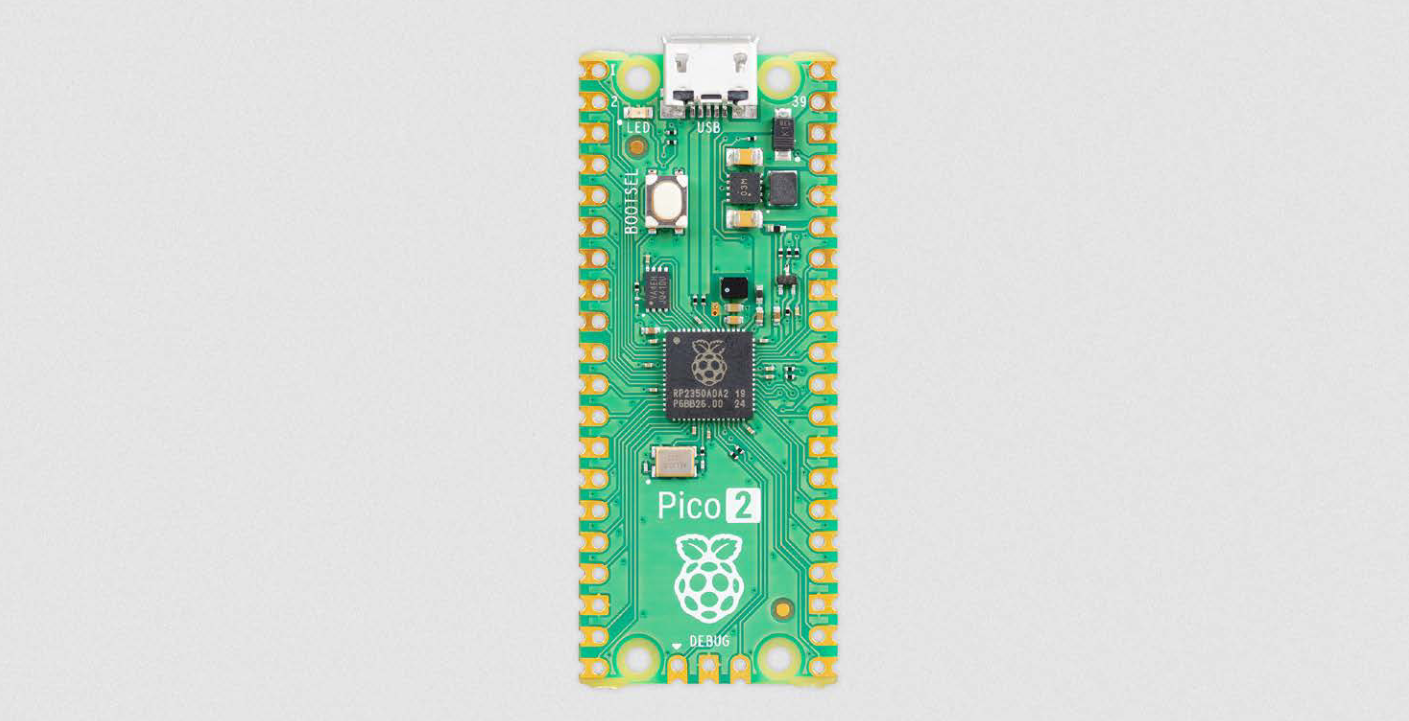
<p><img src="/assets/images/posts/pico2.png" alt="Raspberry Pi Pico 2" />
<em>The Raspberry Pi Pico 2, sourced from their Pico 2 product brief, see below.</em></p>
<p>It’s a drop-in replacement part for the original Pico, which means the pinout and sizing is the same as well as the software should be compatible with any changes, which is actually pretty huge. Ideally, the original Arduino IDE sketch can be reused without any modifications and the used pins on the device also remain the same.</p>

<p>The new RP2350 boasts double the SRAM (520 KB), double the onboard flash (4 MB) and more powerful ARM Cortex-M33 cores. With it finally comes an FPU for faster floating point calculations and they actually fixed the DNL issues with the ADC boosting its performance by 0.5 ENOB! That means I can finally drop all of the botched code for the DNL issue compensation.</p>

<p>The chip also adds a ton of new security features and optional RISC-V cores, which is very exciting to see, but not really relevant for the project. However, this is going to make the Pico 2 and RP2350 hugely more popular for all kinds of different IOT projects as soon as a wireless version comes out.</p>

<p>What I’m excited to see as well is how the power draw changes for the whole device and if the switching regulator on the board changed, which could affect the noise levels on the board and most importantly, the noise at the ADC voltage reference. As far as I’m aware they also changed sleep and dormant modes, which should make them a lot more useful and more low-power compared to before. Anyways, the new core architecture will definitely change power draw, I’m sure. Let’s hope it’s for the better :D</p>

<p>I have pre-ordered a Pico 2 now and I’m going to have a look at it as soon as it arrives. I’m certain it’ll be a substantial upgrade in all of the relevant aspects to the project. I’ll keep you updated!</p>

<p>Check out the product brief from Raspberry Pi (PDF): <a href="https://datasheets.raspberrypi.com/pico/pico-2-product-brief.pdf">Raspberry Pi Pico 2</a></p>

<p>Let me know what you think and how this is going to affect all kinds of different projects!</p>

<h2 id="update-after-testing---29082024">Update after testing - 29/08/2024</h2>

<p>Just tested the board and the results are pretty amazing actually.</p>

<p>The DNL issues, are obviously gone and with it the <code class="language-plaintext highlighter-rouge">cps correction</code> setting and some of the code in the event interrupt that had to handle the 4 error channels. Finally no more random peaks or missing channels in the spectrum! :tada:</p>

<p>Due to this combined with the more powerful processor cores (and FPU), the total dead time reduced significantly, which is probably the biggest change. With the same settings both on the Pico 1 and Pico 2 at default settings the dead time in energy mode halved (!) from ~24µs to ~12µs. The dead time in Geiger mode actually reduced more than that, it only registered ~1µs of dead time on the Pico 2, while the Pico 1 had about 4µs. This is of course only the software-measured dead time, there will still be a bit of a constant overhead on top of all of that, that cannot be measured in software. It’s pretty safe to assume that this hasn’t changed too much between the revisions, so the relative decrease in dead time is very significant.</p>

<p>The flash size is now triple that of the old version at 3 MB reserved for custom spectrum storage. This means you’re able to record almost 3x the amount of spectra before running out of space, which is also huge.</p>

<p>The cherry on top of all of this is that power efficiency went up too. Without any further changes, the detector now consumes a good 10% less power than before according to my testing. I will also investigate the new sleep/dormant modes of the RP2350 as soon as there is support for these.</p>

<p>On a side note, I was able to overclock the Pico 2 to 250 MHz at the default 1V core voltage in the sketch, which is 25 MHz higher than with the Pico 2 (225 MHz). Therefore the <code class="language-plaintext highlighter-rouge">overclock</code> uf2 file will be clocked at 250 MHz from now on.</p>

<p>All of the hardware and software files are up to date now for the Pico 2 and development will continue on the Pico 2 from now on. The new board revision 4.2 is unchanged from the old one besides the switch to the Pico 2 and an updated BOM position for the out-of-stock buzzer.</p>]]></content><author><name>NuclearPhoenix</name><email>hello@nuclearphoenix.xyz</email></author><category term="announcements" /><category term="project-update" /><category term="hardware" /><summary type="html"><![CDATA[The RP2040 microcontroller that is being used in the original Raspberry Pi Pico finally got a worthy successor: the RP2350! And with it Raspberry Pi released a new and improved version of the Pico, fittingly named the Raspberry Pi Pico 2. This is a big change for the Open Gamma Detector project, because it is going to substantially improve device speed and analog readout.]]></summary></entry><entry><title type="html">New commenting feature!</title><link href="https://nuclearphoenix.net/2024/06/10/giscus-comments" rel="alternate" type="text/html" title="New commenting feature!" /><published>2024-06-10T21:00:00+02:00</published><updated>2024-06-10T21:00:00+02:00</updated><id>https://nuclearphoenix.net/2024/06/10/giscus-comments</id><content type="html" xml:base="https://nuclearphoenix.net/2024/06/10/giscus-comments"><![CDATA[<p>I have finally looked into how to set up a commenting feature for some pages and here I am now.</p>

<p>This website now uses giscus to offer comments for all of the blog posts on here, yay!
I’m going to update the <a href="https://gammadb.nuclearphoenix.net/">Gamma Spectrum Database</a> with the same feature momentarily.</p>

<p>Giscus is a very straightforward way to enable commenting on a website and it’s built-in straight to the Jekyll theme I’m using.
It uses my own GitHub repos to store the comments in the repo’s “Discussion” section and you only need a GitHub account to comment.
Just log into the comment section below (one login per website) and you can start writing!</p>

<p>That way, everything is 100% transparent and there is no tracking or ads or anything like that. If you choose to log into your GitHub account to comment, an authentication cookie will be set in your browser for this website only to keep you logged in. That’s it.</p>

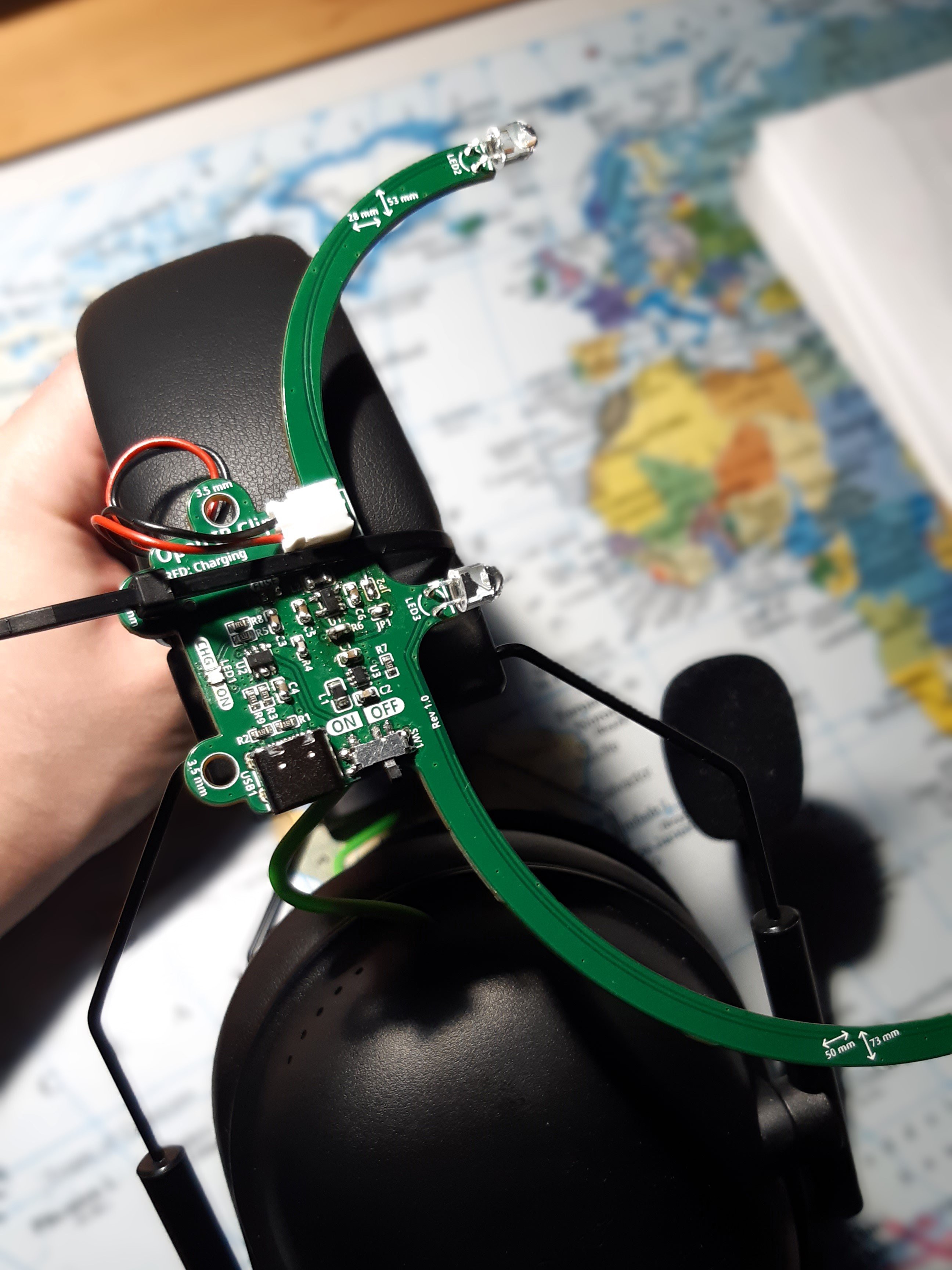
<p>Finally I can say: Please let me know what you think of this new feature down below! Cheers!</p>]]></content><author><name>NuclearPhoenix</name><email>hello@nuclearphoenix.xyz</email></author><category term="announcements" /><summary type="html"><![CDATA[I have finally looked into how to set up a commenting feature for some pages and here I am now.]]></summary></entry><entry><title type="html">My Own IR Head Tracking Clip</title><link href="https://nuclearphoenix.net/2024/03/29/ir-tracking" rel="alternate" type="text/html" title="My Own IR Head Tracking Clip" /><published>2024-03-29T18:30:00+01:00</published><updated>2024-03-29T18:40:00+01:00</updated><id>https://nuclearphoenix.net/2024/03/29/ir-tracking</id><content type="html" xml:base="https://nuclearphoenix.net/2024/03/29/ir-tracking"><![CDATA[<p>I want to show you another project that I have been working on in the mean time. I needed good face tracking for my flight sim setup for which I was actually using Opentrack with AItrack previously (until I noticed that this feature was already built into Opentrack itself lol). However, face tracking wasn’t doing it for me anymore. I really don’t like the fact that you always have to be perfectly lit and you cannot tilt your head too much or the tracker will lose your face. It wasn’t the most responsive either, so I wanted to switch to IR tracking!</p>

<p>I’m now using a classical setup: Opentrack, PS3 Eye camera and an IR clip and I absolutely love the reliability and the responsiveness. Definitely a huge upgrade from the face tracking in my opinion!</p>

<p>This new project is about the IR clip that I built myself. I really wasn’t satisfied by the build quality and the feature set of most of the off-the-shelf clips. Also, some of them are ridiculously expensive for what they are for whatever reason. I wasn’t going to build one out of cardboard and some heavy AA batteries or something like that either. Instead I created a very slim and extremely light clip from scratch that works on a tiny LiPo battery.</p>

<p>Here are some pictures:</p>

<p><img src="/assets/images/posts/irtracking-a.jpg" alt="Crude Mount" />
<em>Simple mount using a cable tie. I could’ve also used some velcro.</em></p>
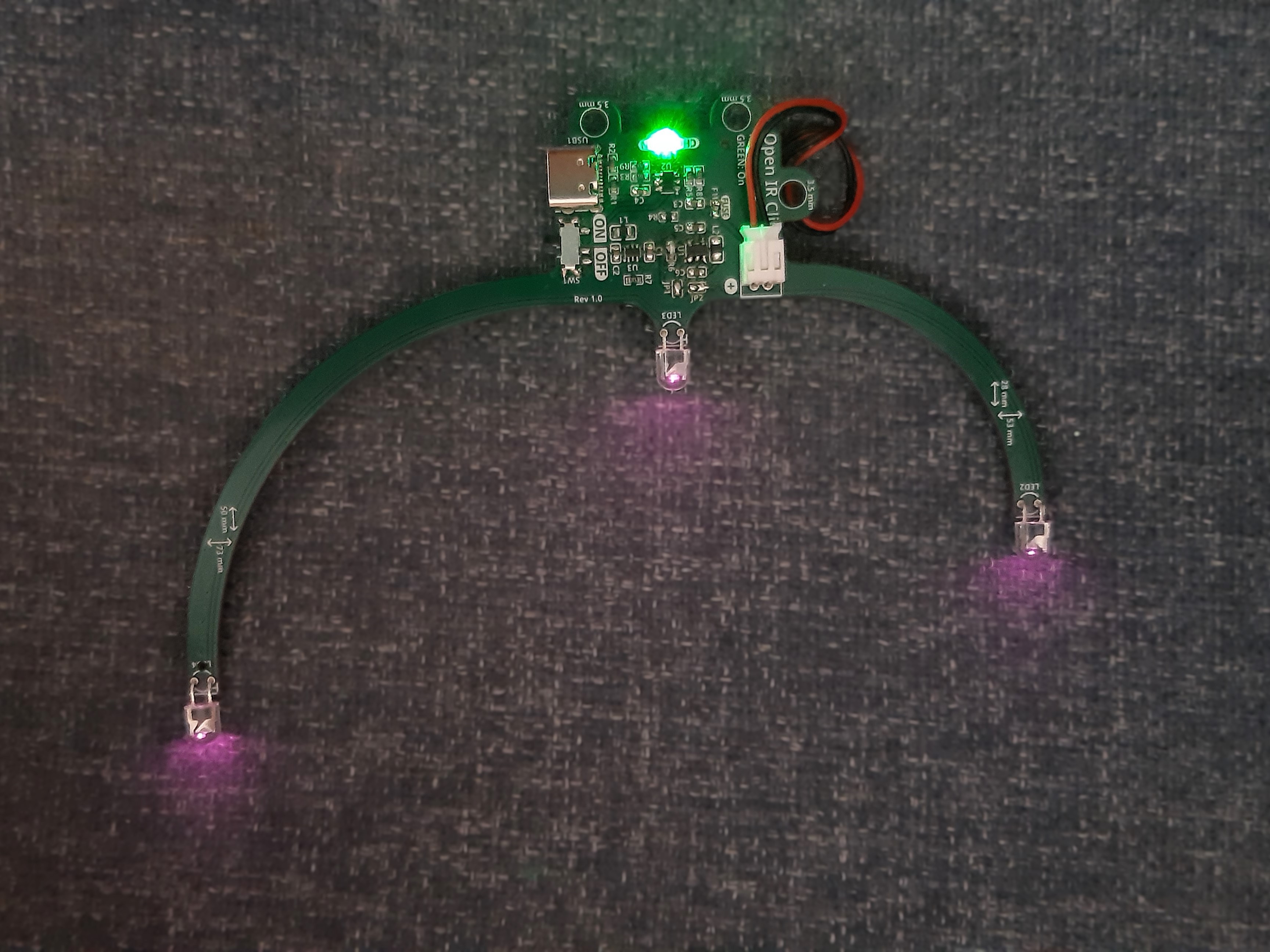
<p><img src="/assets/images/posts/irtracking-b.jpg" alt="On with LEDs" />
<em>Turned on, you can clearly see the wide-angle LEDs and the green status LED. The IR LEDs are invisible to the eye, obviously.</em></p>
<p>This is sort of just a quick teaser for the full project on Hackaday. I will continue to post updates parallel on here and on hackaday, but most of the info is already there. Let me know what you think!</p>

<p><strong>Check it out on Hackaday:</strong></p>

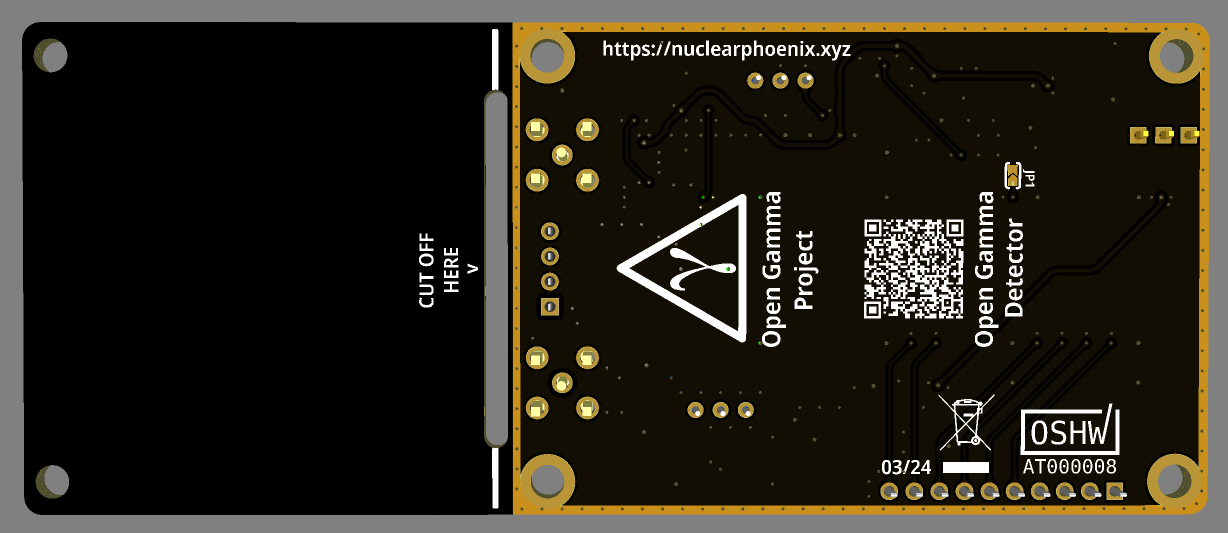
<p><a href="https://hackaday.io/project/195417-compact-ir-head-tracking-clip" class="btn btn--primary btn--large"><i class="fas fa-link"></i> Hackaday</a></p>]]></content><author><name>NuclearPhoenix</name><email>hello@nuclearphoenix.xyz</email></author><category term="showcase" /><category term="hardware" /><category term="sim" /><summary type="html"><![CDATA[I want to show you another project that I have been working on in the mean time. I needed good face tracking for my flight sim setup for which I was actually using Opentrack with AItrack previously (until I noticed that this feature was already built into Opentrack itself lol). However, face tracking wasn’t doing it for me anymore. I really don’t like the fact that you always have to be perfectly lit and you cannot tilt your head too much or the tracker will lose your face. It wasn’t the most responsive either, so I wanted to switch to IR tracking!]]></summary></entry><entry><title type="html">Open Gamma Detector Revision 4.1</title><link href="https://nuclearphoenix.net/2024/03/29/ogd-4.1" rel="alternate" type="text/html" title="Open Gamma Detector Revision 4.1" /><published>2024-03-29T12:00:00+01:00</published><updated>2024-03-29T12:00:00+01:00</updated><id>https://nuclearphoenix.net/2024/03/29/ogd-4.1</id><content type="html" xml:base="https://nuclearphoenix.net/2024/03/29/ogd-4.1"><![CDATA[<p>Did some work on the PCB and slightly updated the layout to make it all look better. The MCX connectors are now placed symmetrically on the board and the silk screen has had a heavy rework. On top of that I also added a grounded guard ring around the perimeter of the electronics section.</p>

<p>The only other change is a different type of 22µF cap for bypassing, which now has an increased max voltage rating to better cope with DC bias. Other than that, everything remains the same.</p>

<p><img src="/assets/images/posts/ogd-4.1-1.png" alt="PCB Front" /></p>

<p><img src="/assets/images/posts/ogd-4.1-2.png" alt="PCB Back" /></p>

<p><strong>Check it out on GitHub:</strong></p>

<p><a href="https://github.com/OpenGammaProject/Open-Gamma-Detector" class="btn btn--primary btn--large"><i class="fab fa-github"></i> GitHub</a></p>]]></content><author><name>NuclearPhoenix</name><email>hello@nuclearphoenix.xyz</email></author><category term="announcements" /><category term="project-update" /><category term="hardware" /><summary type="html"><![CDATA[Did some work on the PCB and slightly updated the layout to make it all look better. The MCX connectors are now placed symmetrically on the board and the silk screen has had a heavy rework. On top of that I also added a grounded guard ring around the perimeter of the electronics section.]]></summary></entry><entry><title type="html">Mini SiD Revision 4.1</title><link href="https://nuclearphoenix.net/2024/03/01/mini-sid-update" rel="alternate" type="text/html" title="Mini SiD Revision 4.1" /><published>2024-03-01T12:00:00+01:00</published><updated>2024-03-01T12:21:00+01:00</updated><id>https://nuclearphoenix.net/2024/03/01/mini-sid-update</id><content type="html" xml:base="https://nuclearphoenix.net/2024/03/01/mini-sid-update"><![CDATA[<p>Just updated the GitHub repository for the Mini SiD for a smaller revision 4.1 launch.
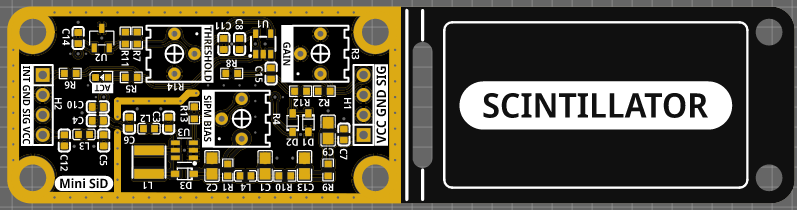
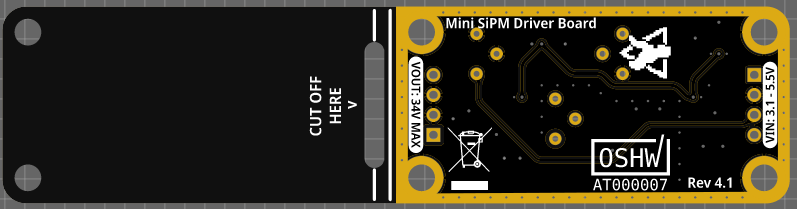
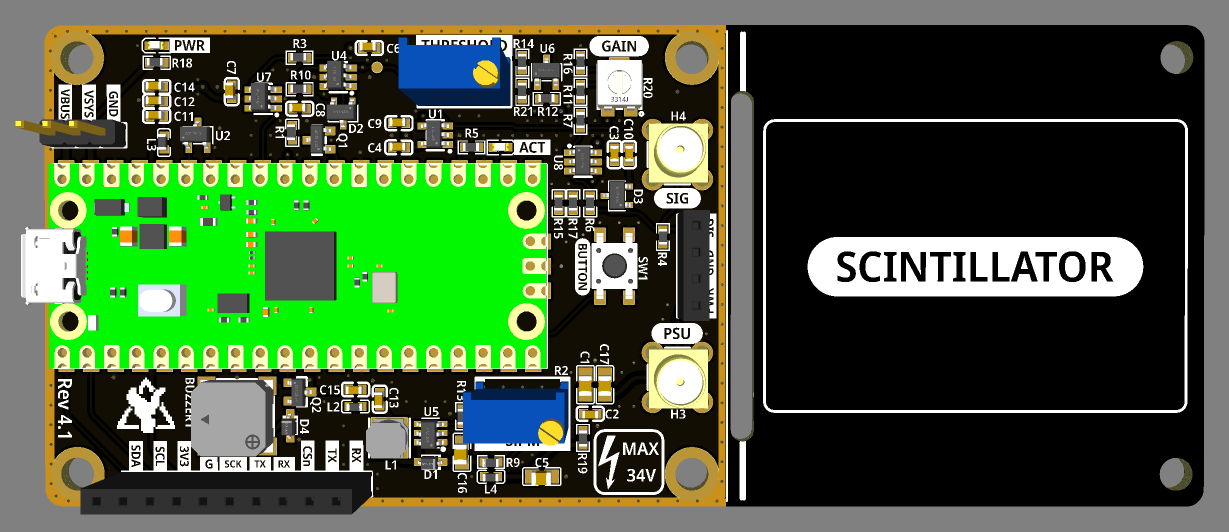
This new board version is mostly a board layout and design update, but there are also a number of other changes that improve on the previous version.</p>

<p>Here are some images of the new PCB. This time I chose black with ENIG to align with the latest Open Gamma Detector revision:</p>

<p><img src="/assets/images/posts/mini-sid1.png" alt="PCB Front" /></p>

<p><img src="/assets/images/posts/mini-sid2.png" alt="PCB Back" /></p>

<p><strong>Changelog:</strong></p>

<ul>
  <li>Decreased size of the electronics section. Board partitioning is now 50:50 electronics and scintillator.</li>
  <li>New voltage reference chip: This change improves the input voltage range down to 3.1 Volts and decreases power consumption by about 1mA @ 5V.</li>
  <li>Changed location of the SiPM input protection diodes to the comparator only. Prevents clamping of the raw signal if you need it.</li>
  <li>Added AC coupling with PZC component to the comparator input.</li>
  <li>Larger bulk decoupling caps and higher voltage rating for the 100nF MLCCs.</li>
</ul>

<p>These changes should make the device even more useful while still holding true to the form factor and remaining cheap to build due to the single sided components and part selection. Also, the new silk screen and PCB layout in general are <em>a lot</em> cleaner now. On top of that, the decrease in power consumption is also very nice to have. Let me know what you think!</p>

<p><strong>Check it out on GitHub:</strong></p>

<p><a href="https://github.com/OpenGammaProject/Mini-SiD" class="btn btn--primary btn--large"><i class="fab fa-github"></i> GitHub</a></p>]]></content><author><name>NuclearPhoenix</name><email>hello@nuclearphoenix.xyz</email></author><category term="announcements" /><category term="project-update" /><category term="hardware" /><summary type="html"><![CDATA[Just updated the GitHub repository for the Mini SiD for a smaller revision 4.1 launch. This new board version is mostly a board layout and design update, but there are also a number of other changes that improve on the previous version.]]></summary></entry></feed>